
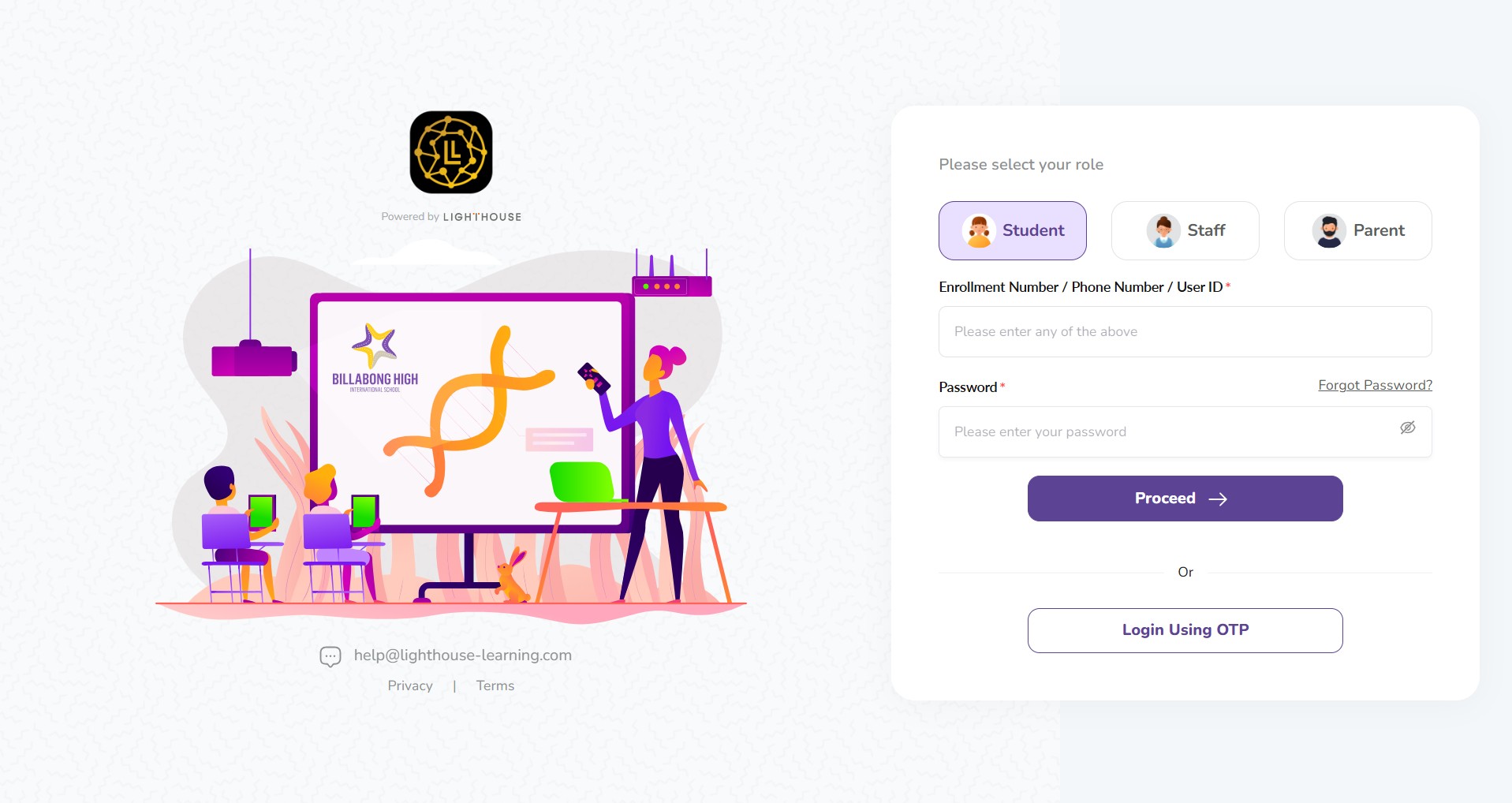
To access your learning resources, schedules, and school updates, you can sign in to Lumos Learn from your computer or mobile device.
Step 1: Access the Login Page
- Open your web browser.
- Go to the Lumos Learn Login Portal at bhis.lighthouse-learning.com. Or
- Download Lumos Learn mobile app from Google Play Store or Apple App Store
Step 2: Select Your Role
On the right side of the screen, select the role that applies to you:
- Student
- Staff
- Parent
Step 3: Enter Your Credentials
For Students
- Enter your Enrollment Number, Phone Number, or User ID.
- Enter your Password and click Proceed.
For Staff
- Enter your Email Address, Phone Number, or User ID.
- Microsoft Login: Staff may also log in using their registered Microsoft business email address by clicking the Microsoft button.
For Parents
- Log in using the registered email address or phone number shared with the school at the time of admission.
- Dual Access: Both mothers and fathers can log in separately using their own individual email IDs and phone numbers.
Note: Only active members of the Billabong High International School ecosystem (students, parents, and staff) can log in.
Alternative Login: Using OTP
If you do not have your password, you can sign in using a One-Time Password:
- Click the Login Using OTP button.
- Enter your registered mobile number or email.
- Enter the code sent to your device to verify your identity.
Troubleshooting & Access Issues
Forgot Password?
If you cannot remember your password, click the Forgot Password? link to begin the recovery process.
Login Trouble?
If you are unable to log in or are having trouble resetting your password, please:
- Raise a ticket using the Parent Connect feature.
- Reach out to the support team at hello@lighthouse-learning.com.
Not a Billabong High International School User?
If you are not currently part of the Billabong High International School ecosystem but would like to gain access, please contact the Billabong High Admissions Team.
Frequently Asked Questions (FAQs)
Only students, parents, and staff who are part of the active Billabong High International School ecosystem can log in to the portal. If you are not a current user but wish to gain access, please contact the Admissions Team at billabonghighschool.com/admissions/.
Parents should use the registered email address or phone number provided to the school during the admission process. You can choose to log in using your password or by selecting the “Login Using OTP” option for a one-time verification code.
Yes. Both the mother and father can log in separately using their own unique email IDs and phone numbers, provided they are both registered with the school.
Staff members can log in using their Email Address, Phone Number, or User ID. Additionally, staff have the option to sign in using their registered Microsoft business email address by clicking the Microsoft icon on the login page.
If you cannot remember your password, click the “Forgot Password?” link located on the login screen. Follow the prompts to reset your credentials. If you continue to have trouble resetting it, you can reach out to hello@lighthouse-learning.com for assistance.
For any login difficulties or technical errors, you can:
- Raise a support ticket directly through the Parent Connect feature.
- Email the support team at hello@lighthouse-learning.com or help@lighthouse-learning.com.
While the system is designed to recognize your registered contact details and if you have a parent or Guardian with more than one ward studying in Billabong High International school you should be able to access the students related information of more than one student simply by switching the profile. Any specific issues regarding linking multiple student profiles to a single parent view should be directed to the school administration or reported via a ticket in the Parent Connect feature to ensure all your children are visible under your account.
